CI/CD for Frappe Bench using Jenkins (Offline / Air-Gapped Setup)
This guide explains how to implement safe CI/CD with rollback for a Frappe Bench application using Docker and Jenkins, when the production server has NO internet access.
This approach is widely used in banks, government infra, and enterprise ERP deployments.
1. Problem Statement
- Frappe Bench applications require schema migrations
- Docker images must be deployed without pulling from internet
- Rollback must restore both code and database
- Deployment must be repeatable, auditable, and safe
2. High-Level Architecture
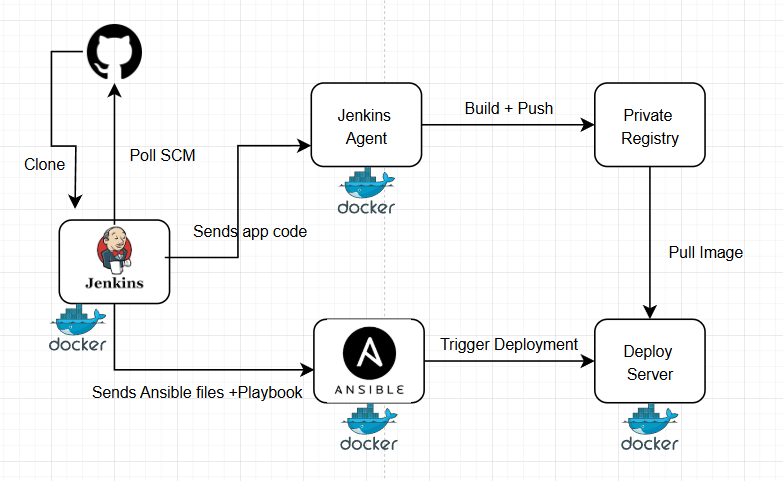
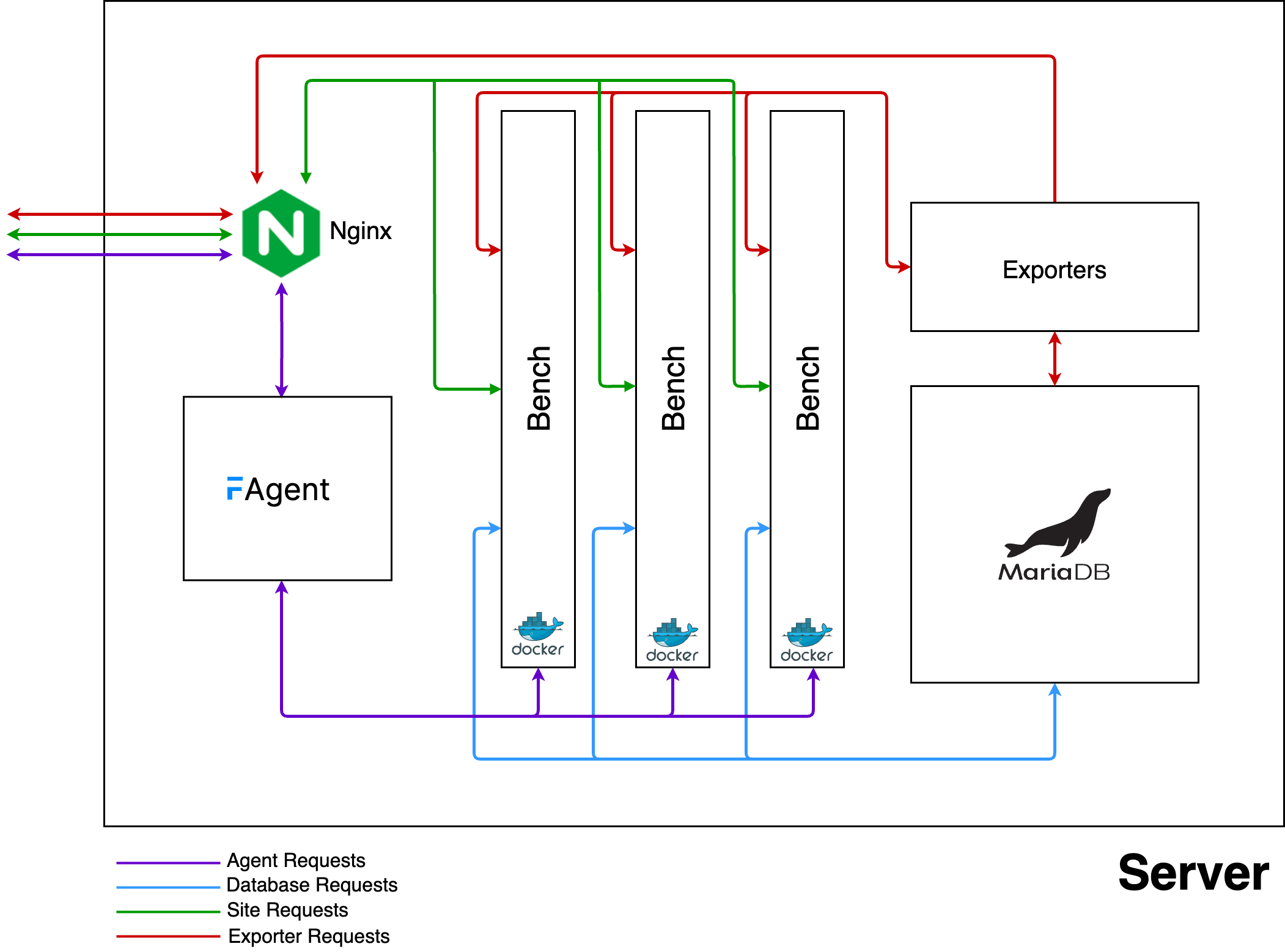
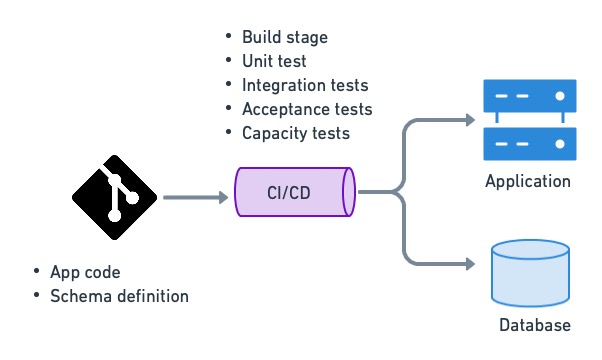
Developer → Git Push
        ↓
Jenkins (Internet Allowed)
        ↓
Build Docker Image
        ↓
docker save → image.tar
        ↓
scp → Offline Server
        ↓
docker load + docker compose up
        ↓
bench migrate
Rollback:
Load old image.tar
Restore matching DB backup
Restart containers
3. Tools Required
CI Server
- Jenkins
- Docker
- Git
Production Server (Offline)
- Docker
- Docker Compose
- SSH access from Jenkins
Optional but Recommended
- Separate Jenkins job for rollback
- Dedicated disk for backups
4. Repository Structure
Your Git repository should look like this:
.
├── Dockerfile
├── docker-compose.yml
├── entrypoint.sh
├── apps/
│   └── custom_app
└── Jenkinsfile
❌ Do NOT commit:
sites/- logs
- secrets
5. Dockerfile (Offline-Safe)
All dependencies must be installed at build time.
FROM frappe/bench:latest

RUN apt-get update && apt-get install -y \
    mariadb-client \
    wkhtmltopdf

COPY entrypoint.sh /entrypoint.sh
RUN chmod +x /entrypoint.sh

ENTRYPOINT ["/entrypoint.sh"]
6. entrypoint.sh (Migration Safety)
#!/bin/bash
set -e

bench migrate
bench clear-cache

exec "$@"
✔ Prevents half-applied migrations ✔ Fails fast if migration breaks
7. docker-compose.yml (Server Side)
version: "3"

services:
  backend:
    image: frappe_app:${VERSION}
    container_name: frappe_backend
    restart: always
Jenkins controls the image version using
${VERSION}
8. Jenkins Setup
8.1 Required Jenkins Plugins
- Git
- Pipeline
- SSH Agent
- Credentials Binding
8.2 SSH Access
From Jenkins server:
ssh-keygen -t ed25519
ssh-copy-id user@frappe-server
Test:
ssh user@frappe-server
9. Jenkinsfile (Full CI/CD Pipeline)
pipeline {
  agent any

  environment {
    IMAGE_NAME = "frappe_app"
    VERSION = "${env.BUILD_NUMBER}"
    SERVER = "user@frappe-server"
    BASE_DIR = "/opt/frappe"
  }

  stages {

    stage('Checkout') {
      steps {
        git branch: 'main',
            url: 'git@github.com:org/frappe-app.git'
      }
    }

    stage('Build Image') {
      steps {
        sh "docker build -t ${IMAGE_NAME}:${VERSION} ."
      }
    }

    stage('Save Image') {
      steps {
        sh "docker save ${IMAGE_NAME}:${VERSION} -o ${IMAGE_NAME}_${VERSION}.tar"
      }
    }

    stage('Backup Database') {
      steps {
        sh """
        ssh ${SERVER} '
          mkdir -p ${BASE_DIR}/backups/${VERSION} &&
          docker exec frappe_backend \
            bench backup --with-files \
            --backup-path ${BASE_DIR}/backups/${VERSION}
        '
        """
      }
    }

    stage('Copy Image') {
      steps {
        sh """
        scp ${IMAGE_NAME}_${VERSION}.tar \
        ${SERVER}:${BASE_DIR}/images/
        """
      }
    }

    stage('Deploy') {
      steps {
        sh """
        ssh ${SERVER} '
          docker load < ${BASE_DIR}/images/${IMAGE_NAME}_${VERSION}.tar &&
          export VERSION=${VERSION} &&
          cd ${BASE_DIR} &&
          docker compose up -d
        '
        """
      }
    }
  }
}
10. Versioned Storage on Server
/opt/frappe/
├── images/
│   ├── frappe_app_41.tar
│   ├── frappe_app_42.tar
├── backups/
│   ├── 41/
│   ├── 42/
✔ Image version == DB backup version ✔ Deterministic rollback
11. Rollback Strategy (CRITICAL)
Golden Rule
Never rollback image without restoring matching DB backup
12. Jenkins Rollback Job
Parameters
ROLLBACK_VERSION(string)
Rollback Pipeline
pipeline {
  agent any

  parameters {
    string(name: 'ROLLBACK_VERSION', description: 'Version to rollback')
  }

  stages {
    stage('Rollback') {
      steps {
        sh """
        ssh user@frappe-server '
          cd /opt/frappe &&
          docker compose down &&
          docker load < images/frappe_app_${ROLLBACK_VERSION}.tar &&
          docker exec frappe_backend \
            bench restore backups/${ROLLBACK_VERSION}/site.sql.gz --force &&
          docker compose up -d
        '
        """
      }
    }
  }
}
Rollback time: ~1 minute
13. Retention Policy (Disk Safety)
Keep last 5 versions only:
ls -t images/frappe_app_*.tar | tail -n +6 | xargs rm -f
ls -t backups | tail -n +6 | xargs rm -rf
14. Common Mistakes to Avoid ❌
- ❌ Using
latestimage tag - ❌ Running migrations manually
- ❌ Skipping DB backup
- ❌ Pulling images on offline server
- ❌ Assuming Frappe supports downgrade migrations
15. Final Checklist ✅
✔ Jenkins Pipeline ✔ Docker image versioning ✔ Offline deployment ✔ Pre-migration DB backup ✔ One-click rollback ✔ Auditable history
16. Conclusion
This CI/CD design is:
- ✔ Enterprise-grade
- ✔ Offline-safe
- ✔ Rollback-ready
- ✔ Frappe-compatible
It is the recommended way to deploy Frappe Bench in restricted environments.