Multi Reverse Proxy Architecture on RHEL
NGINX → Traefik → Frappe (VPN-Only, Hostname-Based Routing)
Abstract
In restricted enterprise environments (VPN-only, SELinux enforcing, firewalld enabled), applications are often exposed on non-standard ports such as :8100.
While functional, this approach leads to:
- Poor user experience
- Security concerns
- Scalability limitations
This article documents a multi reverse proxy architecture that cleanly exposes applications using hostnames only, without leaking internal ports, while keeping all security controls enabled.
Target Architecture
Client (VPN)
   |
   | http://s1.inxeoz.com
   |
NGINX (host :80)
   |
   | proxy_pass http://127.0.0.1:8100
   v
Traefik (Docker reverse proxy)
   |
   v
Frappe (site routing by Host header)
Components & Roles
-
NGINX Front door
- Listens on port 80
- Routes by hostname
-
Traefik Service router
- Runs in Docker
- Routes to correct container
-
Frappe / ERPNext Application router
- Selects site based on HTTP
Hostheader
- Selects site based on HTTP
🔑 PRE-CONDITIONS (MANDATORY)
Do NOT proceed unless all of the following are true.
1️⃣ VPN Connectivity Works
From the client machine:
ping <SERVER_IP>
Expected:
- Replies received
- No packet loss
2️⃣ Hostname Resolution Exists (Client-Side or Internal DNS)
From VPN client:
ping s1.inxeoz.com
ping s2.inxeoz.com
Expected:
PING s1.inxeoz.com (<SERVER_IP>)
If DNS is not available, /etc/hosts (or Windows hosts file) must already contain:
<SERVER_IP>   s1.inxeoz.com
<SERVER_IP>   s2.inxeoz.com
⚠️ DNS/hosts must be correct before touching NGINX
3️⃣ Traefik ALREADY Works by Host Header
From the server:
curl -H "Host: s1.inxeoz.com" http://127.0.0.1:8100
Expected:
HTTP/1.1 200 OK- Frappe HTML output
❌ If this fails → STOP Traefik/Frappe must be fixed first.
4️⃣ Frappe Sites Already Exist
Frappe must already have sites created:
bench --site s1.inxeoz.com list-apps
bench --site s2.inxeoz.com list-apps
If the site does not exist, hostname routing will never work.
5️⃣ NGINX Is Running on Port 80
On the server:
ss -tulnp | grep ':80 '
Expected:
users:(("nginx",pid=...))
❌ If Apache/httpd owns port 80 → stop and reassess.
Data Flow Diagram (DFD – Level 1)
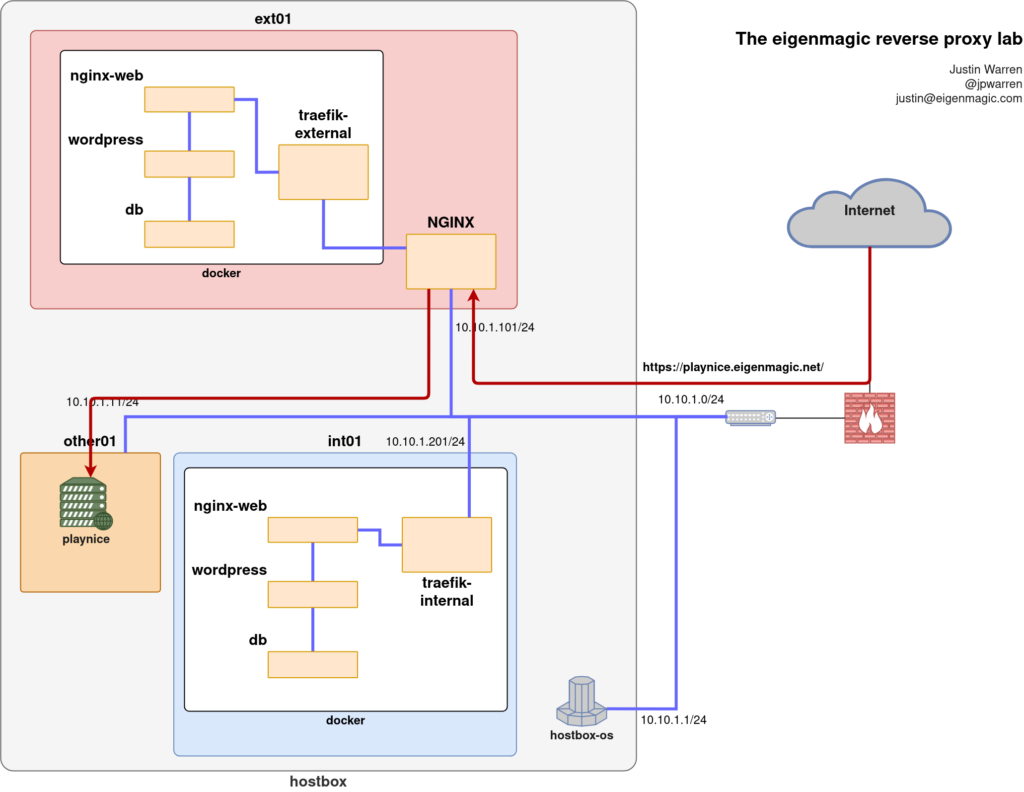
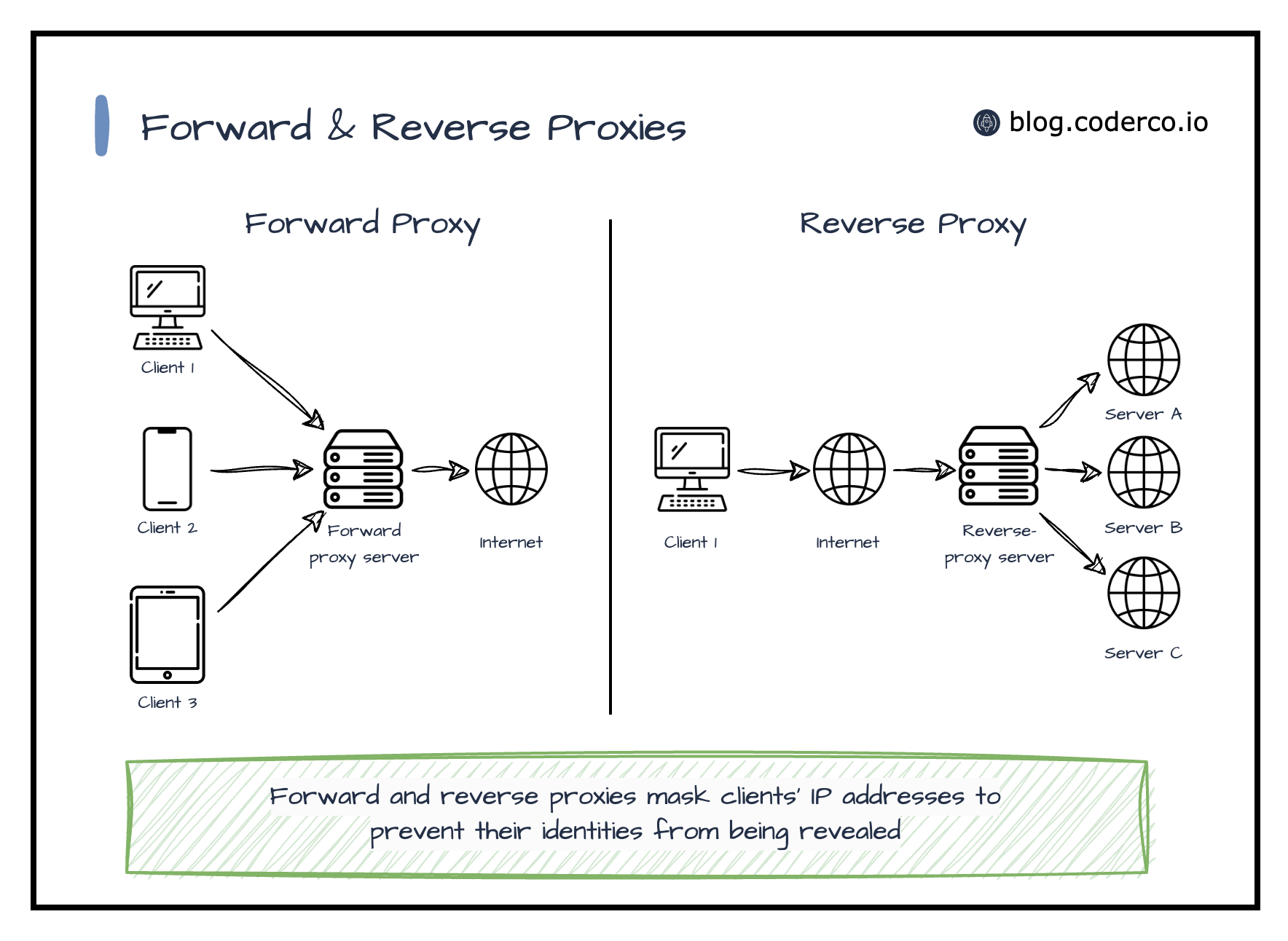

Flow Explanation:
- VPN client requests
http://s1.inxeoz.com - Hostname resolves to server IP
- Request hits NGINX on port 80
- NGINX proxies to Traefik on 127.0.0.1:8100
- Traefik forwards to Frappe container
- Frappe selects site via
Hostheader - Response flows back upstream
Implementation Steps (Safe & Ordered)
🔒 Step 1: Backup NGINX Configuration
cp -a /etc/nginx /root/nginx-backup-$(date +%F-%H%M)
Rollback is guaranteed.
✏️ Step 2: Add NGINX Server Block
Create a new file only:
vim /etc/nginx/conf.d/inxeoz-frappe.conf
server {
    listen 80;
    server_name s1.inxeoz.com s2.inxeoz.com;

    location / {
        proxy_pass http://127.0.0.1:8100;

        proxy_set_header Host $host;
        proxy_set_header X-Real-IP $remote_addr;
        proxy_set_header X-Forwarded-For $proxy_add_x_forwarded_for;
        proxy_set_header X-Forwarded-Proto $scheme;

        proxy_http_version 1.1;
        proxy_set_header Connection "";
    }
}
🔍 Step 3: Validate Configuration
nginx -t
Expected:
syntax is ok
test is successful
❌ Any error → STOP
🔄 Step 4: Reload NGINX (NO RESTART)
systemctl reload nginx
SELinux REQUIREMENT (RHEL-Specific)
On RHEL / Rocky / Alma:
getenforce
Expected:
Enforcing
Enable outbound proxy connections without disabling SELinux:
setsebool -P httpd_can_network_connect on
Firewall REQUIREMENT
Confirm port 80 is allowed:
firewall-cmd --list-ports | grep 80
If missing:
firewall-cmd --add-port=80/tcp
firewall-cmd --add-port=80/tcp --permanent
firewall-cmd --reload
Verification Checklist (CRITICAL)
✅ Server-Side Tests
curl -H "Host: s1.inxeoz.com" http://127.0.0.1
Expected:
200 OK- Frappe HTML
✅ Client-Side Tests (VPN)
Browser or CLI:
http://s1.inxeoz.com
http://s2.inxeoz.com
Expected:
- No port in URL
- Correct Frappe site loads
Common Failure Modes & Help Commands
❌ 502 Bad Gateway
Check SELinux:
getenforce
setsebool -P httpd_can_network_connect on
Check logs:
journalctl -u nginx --no-pager | tail
❌ Works on server but not client
Check firewall:
firewall-cmd --list-ports
Check VPN routing:
ping <SERVER_IP>
❌ Traefik works on :8100 but not via NGINX
Confirm backend reachability:
curl http://127.0.0.1:8100
Confirm Host header:
curl -H "Host: s1.inxeoz.com" http://127.0.0.1:8100
Security Posture (Final State)
| Layer | Status |
|---|---|
| SELinux | Enforcing ✅ |
| firewalld | Enabled ✅ |
| VPN | Required ✅ |
| Docker | Isolated ✅ |
| App ports | Hidden ✅ |
Final Mental Model (Remember This)
NGINX decides WHERE Traefik decides WHICH service Frappe decides WHICH site
Each layer does one job only.
Conclusion
A multi reverse proxy is not complexity — it is correct separation of concerns.
This design:
- Removes port exposure
- Preserves security controls
- Scales cleanly to many subdomains
- Works fully inside VPN-only environments